How to set up auto order submission
September 02, 2025 · Updated
Auto Order Submission lets Tapstitch automatically send your store's orders for fulfillment - no manual clicks required. When combined with Auto Payments, the entire order-to-payment process runs on autopilot.
What is Auto Order Submission?
When your store receives a new order, Tapstitch can automatically (or manually, depending on your settings) submit it to our fulfillment system based on your selected submission strategy.
Available submission strategies
For each store, you can choose from three order submission strategies:
| Submission Method | Description | Best For |
| Manual Submission | Orders must be manually submitted by clicking the "Submit" button | Low-volume orders or when manual review is needed |
| Automatically (1 Hour) | Orders are submitted automatically at the beginning of every hour | Time-sensitive orders needing regular, frequent processing |
| Automatically (Set time) | Orders are submitted automatically in batches at your chosen daily time | Sellers who prefer processing orders once per day |
How to set up Submission Strategy
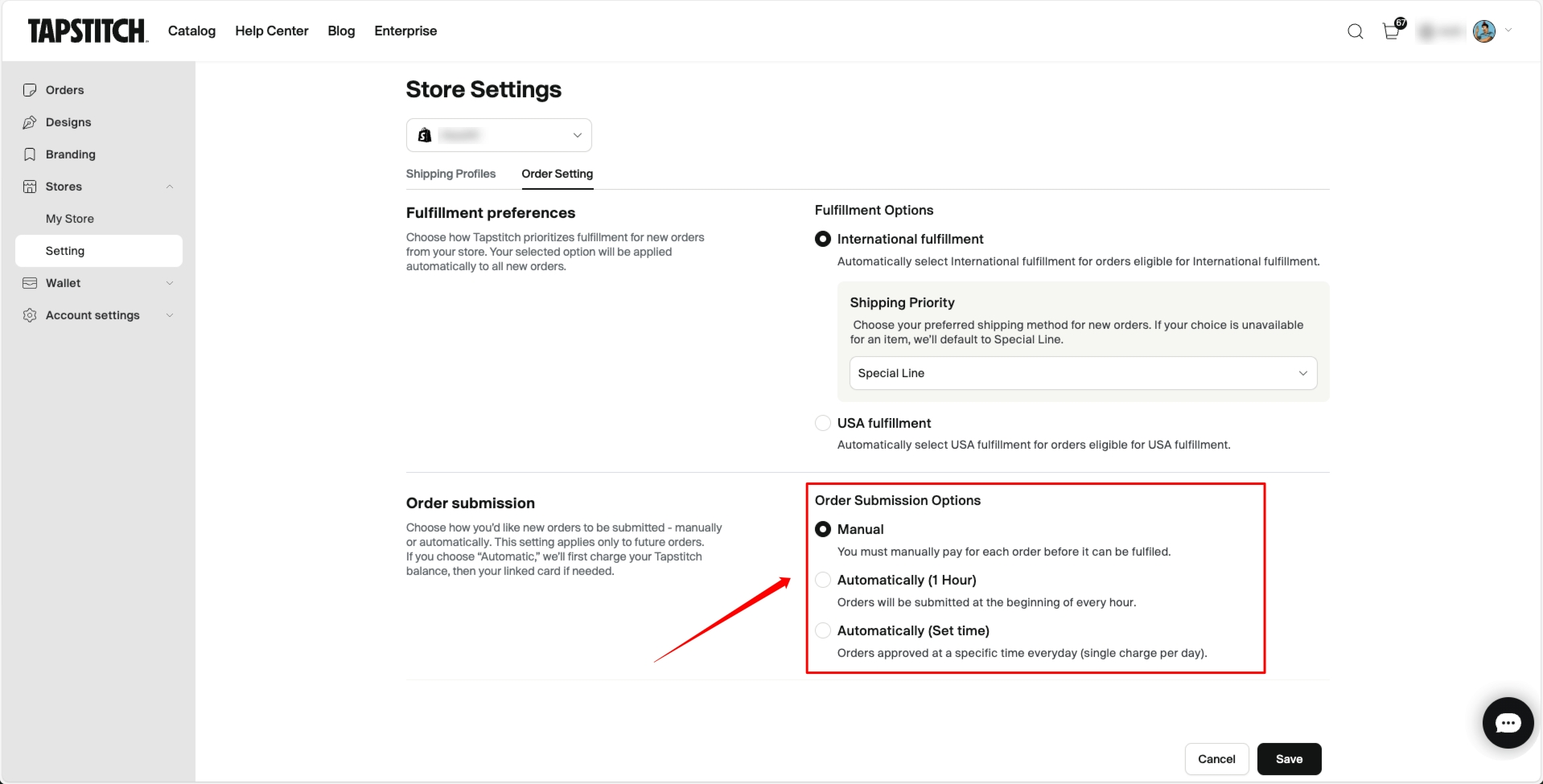
- Go to Account Center > Store Settings
- Select the store you want to configure
- Open the Order Settings tab
- Under "Order Submission Options", choose your preferred method:
- Manual Submission
- Auto Submission (1 Hour)
- Auto Submission (Set time)
If you select Scheduled Submission, you'll need to specify the time (12-hour format + AM/PM) and your time zone.
How payments work with Auto Submission
Once Auto Submission is enabled, Tapstitch will initiate payment automatically when an order is submitted:
- Wallet balance is used first (if sufficient)
- If the wallet balance is insufficient, the system charges your linked bank cards, starting with the default
- If payment is unsuccessful, the order status will remain "Pending Submission", and you'll receive a failure notification Haven't set up Auto Payments yet? See: How to Set Up Auto Payments
Rules & limitations
- Auto Submission is unavailable if no bank card is linked
- If all cards are removed, the system automatically reverts to Manual Submission
- Changes only apply to new orders, not existing ones
- For Scheduled Submission, orders created before the scheduled time will be submitted in batches
- Orders with On Hold status will also be submitted during the next scheduled run - review old orders to avoid unintended submissions
When Auto Submission fails
If Tapstitch cannot automatically submit an order (for example, due to insufficient balance or card failure), you will:
- Receive an email notification with:
- Order number(s)
- Reason for failure
- A direct link to manually fix the issue
- See a warning label “Auto Submit Failed” on the order page for quick identification
Frequently Asked Questions
Q: What time will Scheduled Submission be executed?
A: Orders will be submitted at the time you set, based on your local time zone.
Q: What happens if I enable Auto Submission but haven't added a card?
A: The system won't be able to charge your account, and order submission will fail. Please add a card first.
Still have questions?
Contact the Tapstitch Support Team via the Help Center.
Was this article helpful?
30 found this helpful