How to update the shipping address or shipping method after payment
July 01, 2026 · Updated
Changes to shipping address or shipping method are allowed in specific scenarios exclusively, with the prerequisite that the order is in the status of "paid but not shipped". The system will automatically recalculate shipping fees and taxes based on the updated shipping information and process any required additional payment or refund.
Which orders can be updated?
Order update availability depends on the fulfillment type: US Fulfillment
- Orders cannot be updated once production starts.
International Fulfillment
- Orders cannot be updated once partially shipped or shipped.
For all orders, updates are allowed only if:
- No partial refund or refund under review
- Not previously updated (each order can only be updated once)
If an order is not eligible, the “Update Shipping” button will not appear on the order details page.
What information can be updated?
You can update the following information:
- Shipping address (including recipient name and phone number)
- Shipping method
Address update scope
- US Fulfillment orders: The shipping address can only be updated to a U.S. address
- International Fulfillment orders: The shipping address can be updated to any international address
How do I update the shipping address or shipping method?
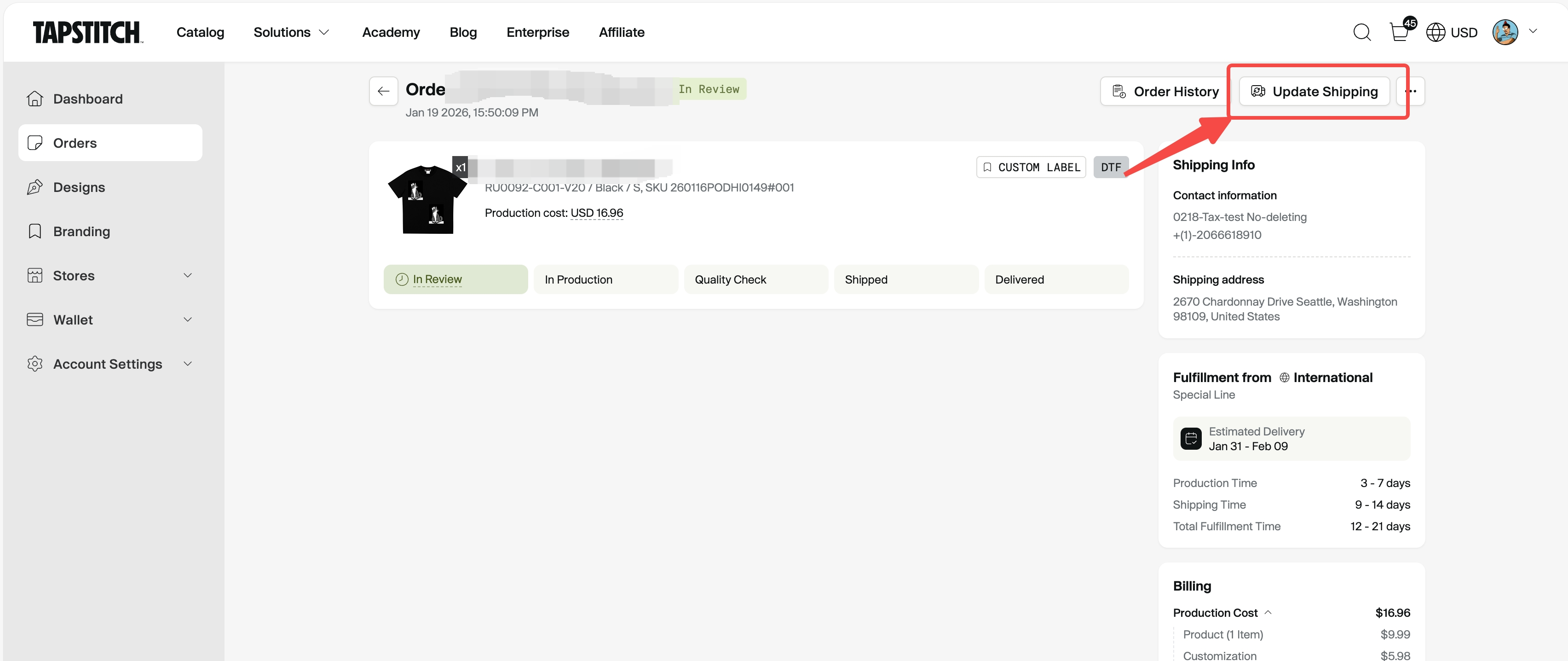
- Go to the Order Details page
- Click “Update Shipping”
- Enter a new shipping address or select a new shipping method
- Review the fee changes and submit
How are fees recalculated after the update?
Based on the new shipping address and shipping method, the system will recalculate:
- Updated shipping fees
- Updated taxes
These amounts will be compared with the shipping fees and taxes you actually paid for the original order (after any discounts were applied). Please note: If changes to your order result in a different order total, previously applied shipping discounts may no longer be applicable. Shipping fees and taxes will be recalculated based on the updated order details.
After submitting the update, one of the following may occur
Additional payment required
If the updated shipping fees and taxes are higher than the original amount:
- The page will show the additional amount due
- You can pay using your wallet, a third-party payment method, or a combination of both
- After clicking “Confirm & Pay”, a pending payment order will be created
- Please complete the payment within 30 minutes
⚠️ If payment is not completed within 30 minutes, the order will revert to the original shipping information and continue normal fulfillment.
No price difference
If the updated fees are the same as the original amount:
- No additional payment or refund is required
- The shipping information will be updated successfully
Refund required
If the updated shipping fees and taxes are lower than the original amount:
- The difference will be refunded to the original payment method
- If both wallet and third-party payments were used, the refund will be issued to the wallet first
- The shipping information will be updated first, and the refund will be processed automatically afterward
⚠️ If the refund cannot be completed due to a system issue, please contact customer support for further assistance.
What happens after the update is successful?
Once the shipping information is successfully updated:
- The order’s shipping address, shipping method, and estimated fulfillment time will be updated
- The order bill will reflect the updated shipping fees, taxes, discounts, and wallet amounts
- You will receive a confirmation email notifying you that the shipping information has been updated
Important notes
- Each order can only be successfully updated once
- Once an order enters the shipping process, it can no longer be updated
- If additional payment is required, the order will be temporarily locked and will not ship until payment is completed
- If a refund fails, please contact customer support for further assistance.
FAQ
Q: Why don’t I see the “Update Shipping” button?
A: Possible reasons include the order has already shipped, the order was canceled, the order has an active refund, or the shipping information has already been updated once.
Q: Will updating the shipping information affect delivery time?
A: It may. After the update, the estimated fulfillment time will be based on the new shipping address or shipping method.
Q: Can I update the shipping address more than once?
A: No. Each order can only be successfully updated once.
Q: Can I update my shipping address after my order has been shipped?
A: Once an order has been shipped, we’re unfortunately unable to update the delivery address directly. However, our customer support team is happy to help by providing the carrier’s contact information, so you can reach out to the carrier directly to check whether an address update may still be possible.
Was this article helpful?
7 found this helpful