How to Set Fulfillment Preferences
August 14, 2025 · Updated
Tapstitch lets you set default fulfillment strategies and shipping methods for each of your stores. Once set, the system automatically chooses the best warehouse and shipping service for every order - no manual steps needed.
What are fulfillment preferences?
Fulfillment preferences define your store's default order fulfillment settings, including:
- Preferred fulfillment warehouse (e.g., US Fulfillment or International Fulfillment)
- Default shipping carriers for each fulfillment method (e.g., USPS or Special Line)
Once configured, Tapstitch automatically applies these preferences to create the best fulfillment plan for each new order.
Available fulfillment methods
Currently, Tapstitch supports two fulfillment modes:
| Fulfillment Method | Description | Best for |
| USA Fulfillment | Orders are shipped from a US-based warehouse | Ideal for US markets and fast delivery |
| International Fulfillment | Orders are shipped from a China-based warehouse | Suitable for international or cost-effective delivery |
How to set fulfillment preferences
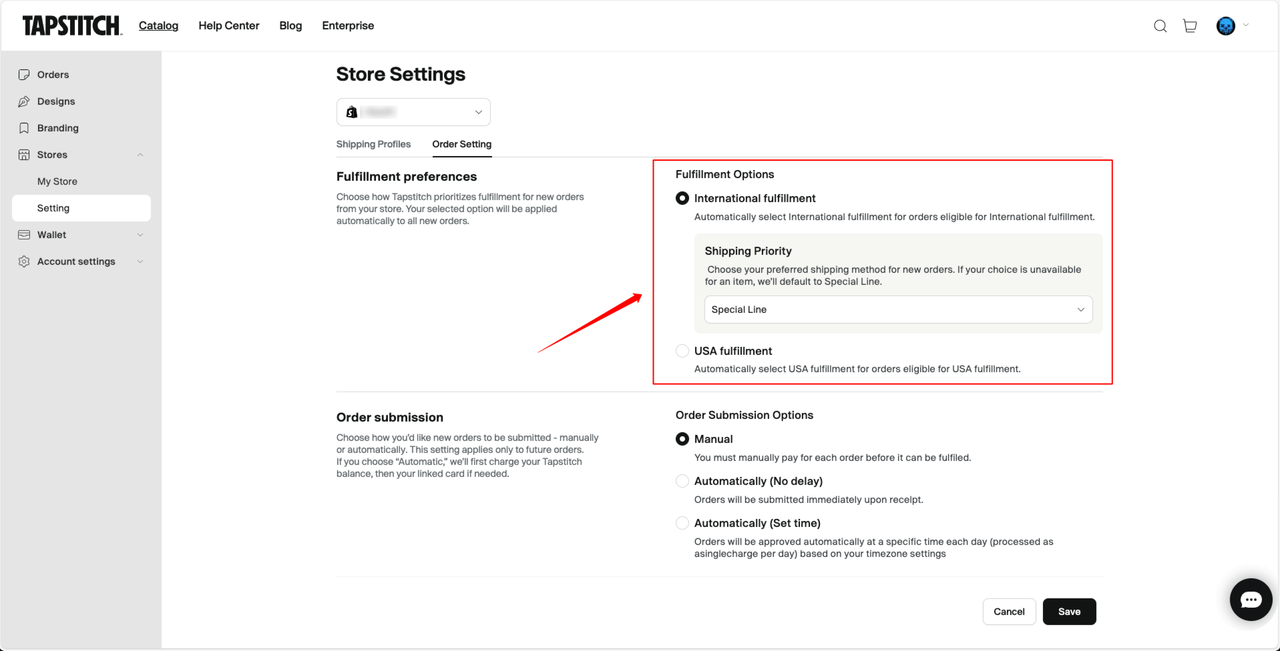
- Go to Account Center > Store Settings.
- Select your target store and navigate to the Order Settings tab.
- In the Fulfillment Preferences section, configure the following:
- Default fulfillment method (USA Fulfillment / International Fulfillment)
- Priority of shipping carriers for the selected method
Examples:
- Choose USA Fulfillment and set USPS as your preferred carrier.
- Choose International Fulfillment and set Special Line as the default carrier.
System matching logic
When a new order is created, Tapstitch follows these rules:
- The system first attempts to use your chosen fulfillment method and carrier.
- If the product isn't available in your chosen warehouse (e.g., no stock in US warehouse), the system will automatically fall back to International Fulfillment.
- If your chosen shipping carrier isn't available, the system will default to Special Line.
You don’t need to take any manual action - the system always aims to fulfill orders based on your preferences.
Best practices
- If most of your customers are in the US, we recommend setting USA Fulfillment as the default.
- If you're focused on cost savings, International Fulfillment is the more budget-friendly option.
- These settings apply only to store-sourced orders (e.g., from Shopify, Etsy, Wix, etc.).
- Fulfillment preferences are set per store - configure them individually for each store.
System behavior notes
- Once set, new orders will automatically follow your fulfillment preferences.
- If no preferences are set, the system will default to International Fulfillment + Special Line.
- Existing orders will not be affected - preferences apply to new orders only.
- The old “Fulfillment Options” setting has been merged into this updated configuration.
Frequently Asked Questions
Q: What happens if an item is out of stock in the US warehouse?
A: The system will automatically switch to International Fulfillment and use the default carrier (e.g., Special Line).
Q: Can I set different fulfillment preferences for each store?
A: Yes. Each store can have its own fulfillment preferences.
Q: Can I manually change the fulfillment method for an order?
The system applies your defaults, but you can edit the fulfillment method on the order page before submission.
Need help?
If you have questions about setting your fulfillment preferences or managing orders, contact the Tapstitch Support Team via the Help Center.
Was this article helpful?
12 found this helpful