How can I connect TikTok Shop US with Tapstitch?
August 04, 2026 · Updated
Connecting your TikTok Shop US account to Tapstitch lets you publish your Tapstitch products directly to your TikTok Shop, making it easy to start selling in just a few steps.
Before you begin
Make sure:
- Your TikTok Shop seller account is active.
- Your shipping settings are configured for seller-managed fulfillment.
Note: The TikTok Shop US integration is designed for US-based TikTok Shop sellers and supports products fulfilled within the United States. For the best publishing experience, use Tapstitch products and fulfillment options available for the US market.
How it works
TikTok Shop allows merchants to sell directly on TikTok while managing products, orders, and store settings through TikTok Shop Seller Center. Once you've connected your shop to Tapstitch, you can:
- Create and prepare products in Tapstitch
- Publish products directly to your TikTok Shop
- Manage orders through your TikTok Shop workflow while Tapstitch handles production and fulfillment
Connect your shop once, then publish your products whenever you're ready.
Step 1: Connect your TikTok Shop
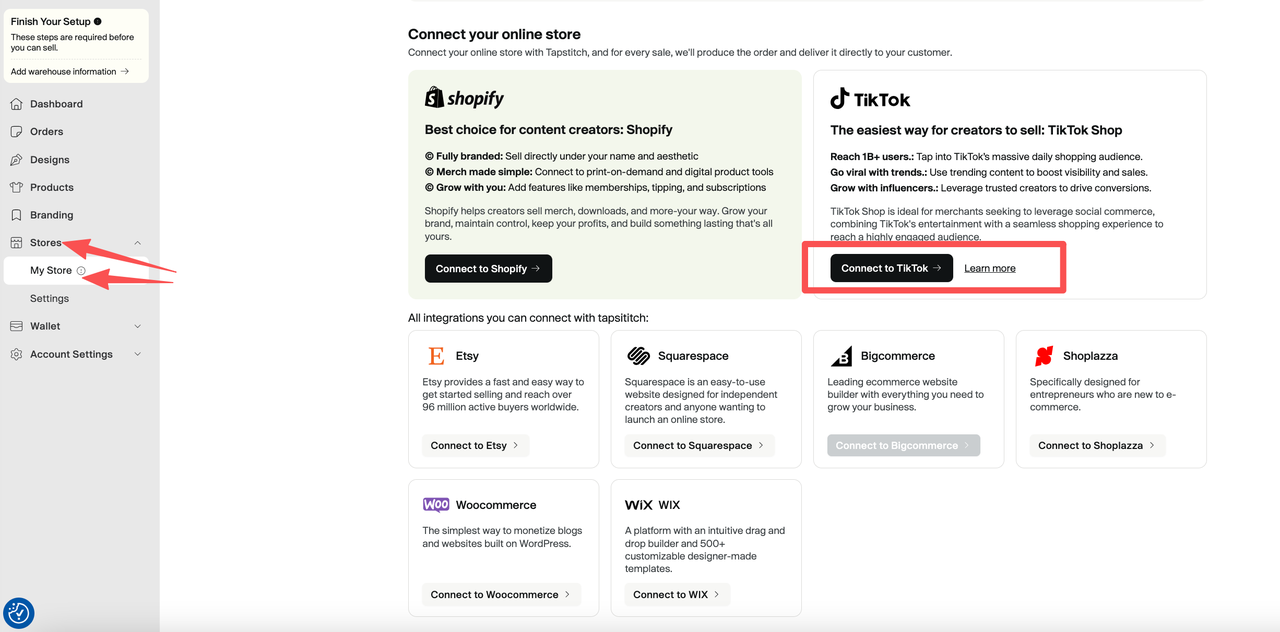
If you don't have a Tapstitch account yet, create one first. If you've already connected other sales channels, click Add Store to connect another one. Follow these steps:
- Log in to your Tapstitch account.
- Go to Stores.
- Select TikTok Shop.
- Click Connect to TikTok.
- Continue to the TikTok authorization page.
Step 2: Set up your TikTok Shop account
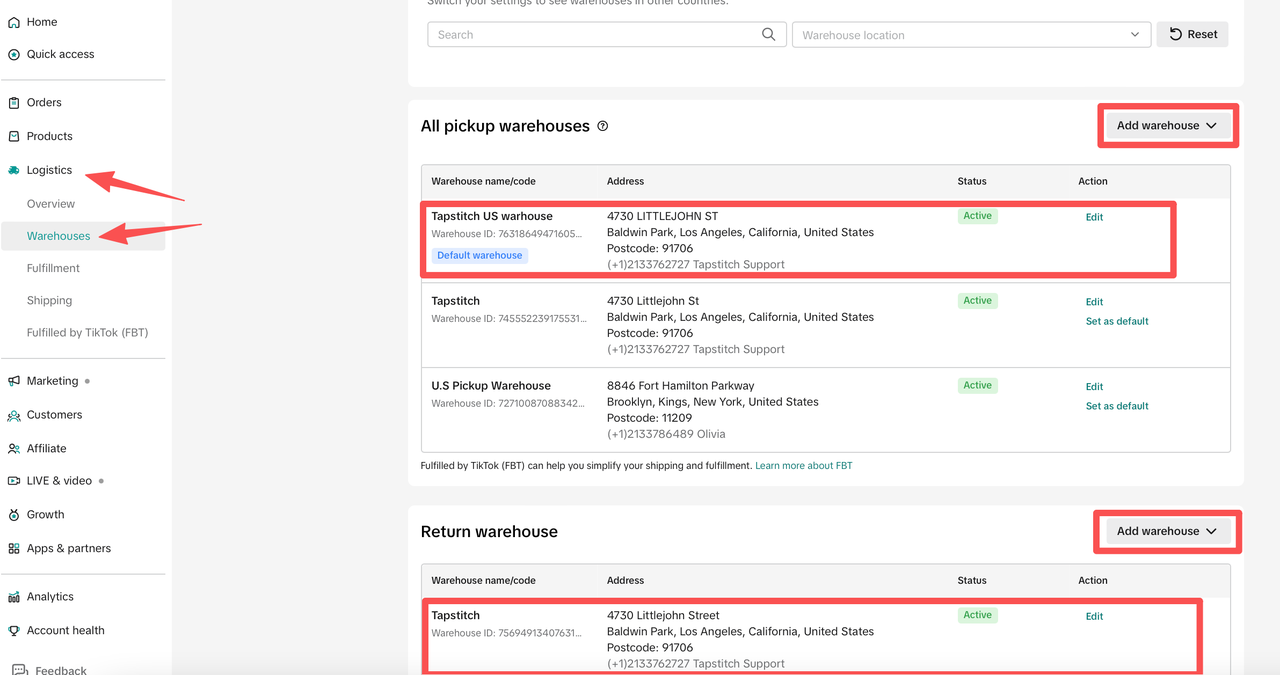
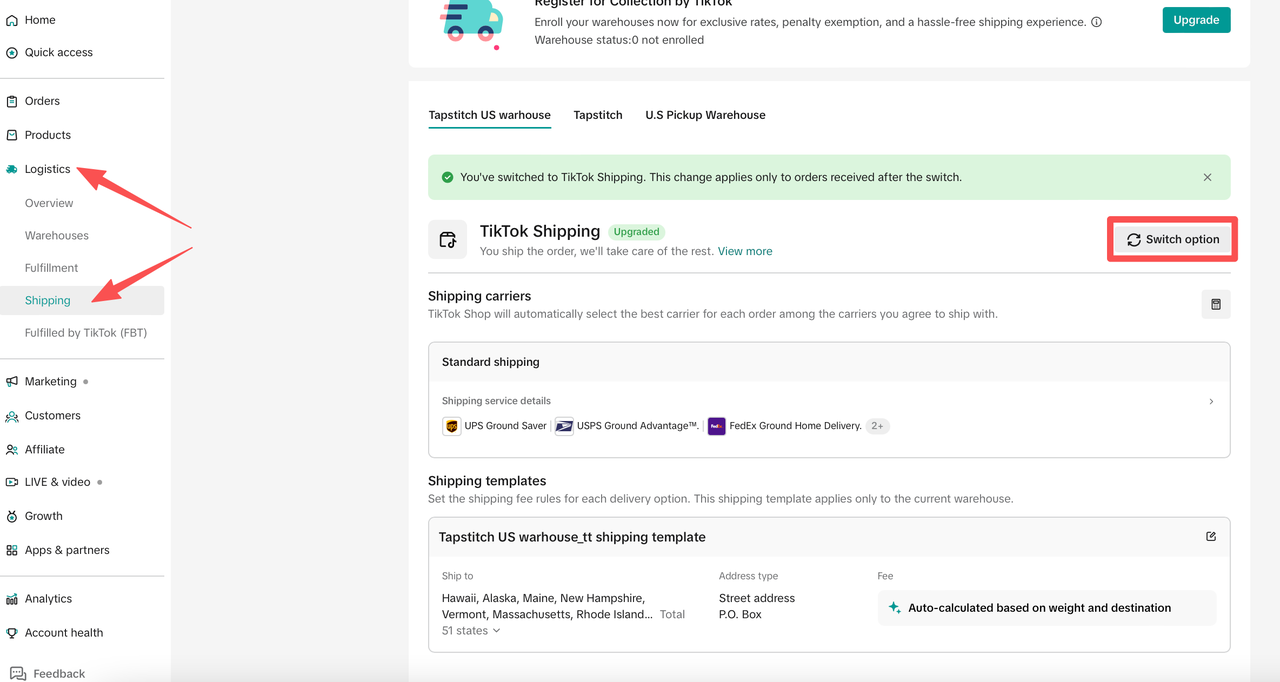
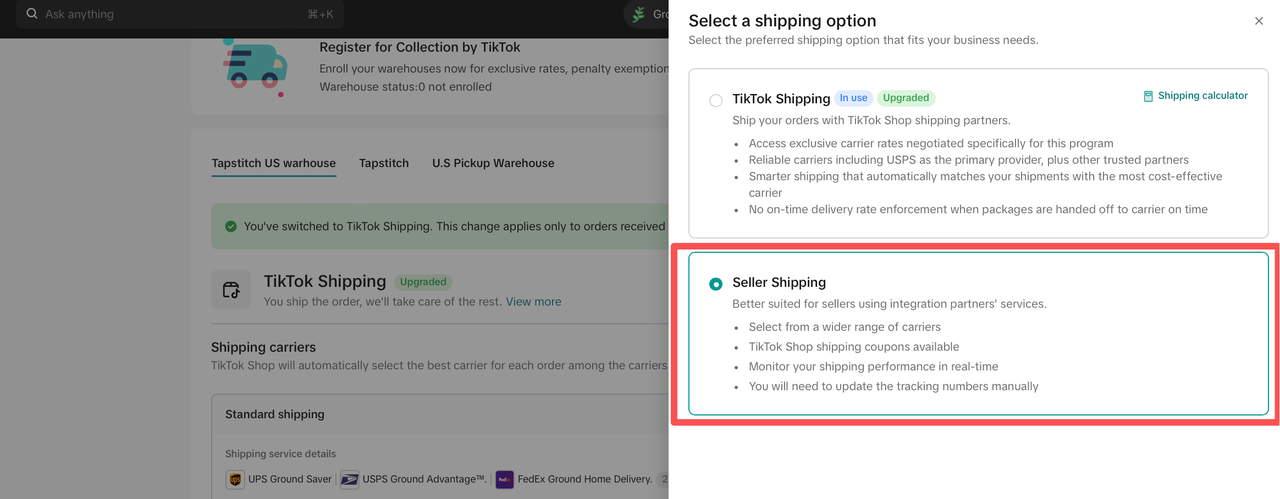
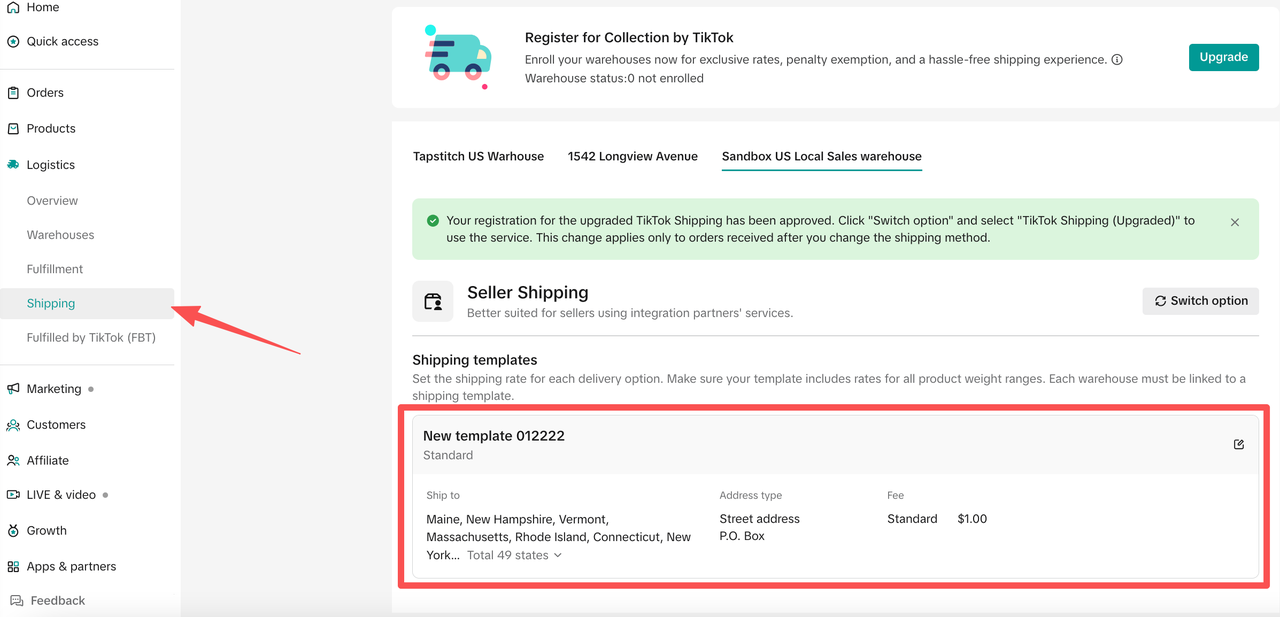
Before connecting your shop, make sure your TikTok Shop account is fully set up. If you haven't finished creating your TikTok Shop seller account, complete the onboarding process in TikTok Shop Seller Center first. To ensure Tapstitch can publish products and fulfill orders successfully, verify the following:
- Your TikTok Shop US seller account is active.
- Your pickup and return warehouse information has been added in TikTok Shop Seller Center.
- Seller Shipping is enabled for the warehouse you'll use with Tapstitch products.
- A shipping template has been created and assigned to that warehouse.
Once your TikTok Shop and shipping settings are ready, return to Tapstitch to continue connecting your store.
Step 3: Install and authorize the Tapstitch app in TikTok Shop
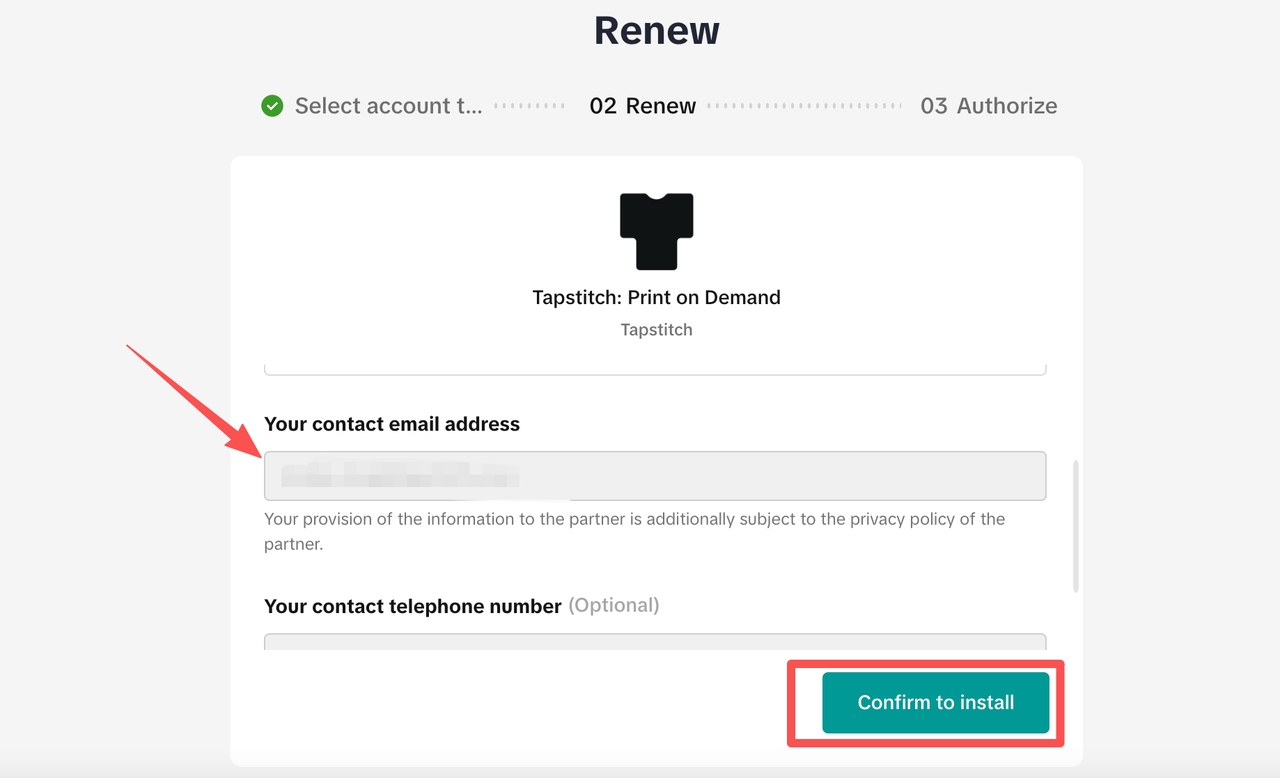
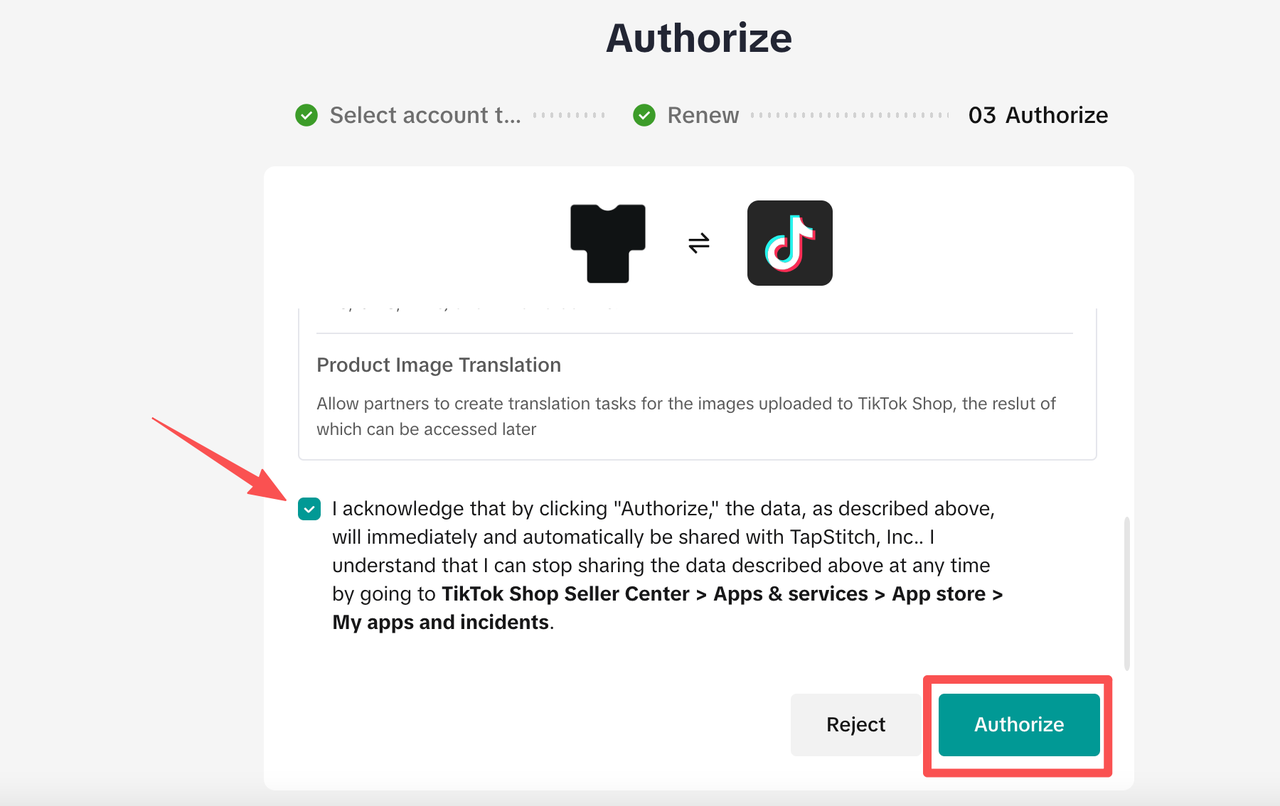
After you click Connect to TikTok, you'll be redirected to TikTok Shop Seller Center to authorize the Tapstitch app. During the authorization process, you may be asked to confirm your contact email before installing the app. Tapstitch will request permission to connect your store, publish products, sync product information, and support order fulfillment. To complete the authorization:
- Confirm the TikTok Shop account you want to connect.
- Review the permissions requested by Tapstitch.
- Select the acknowledgment checkbox if prompted.
- Click Authorize or Confirm.
- Wait to be redirected back to Tapstitch.
Once authorization is complete, your TikTok Shop will be connected and ready for product publishing.
Step 4: Complete the publishing prerequisites
After authorization, your TikTok Shop should appear as Connected in Tapstitch. Before publishing products, take a moment to confirm that your TikTok Shop is fully configured. Most sellers should verify the following:
- Tax information has been submitted in TikTok Shop Seller Center, if required.
- Your connected warehouse is configured for Seller Shipping.
- A shipping template has been created and assigned to your warehouse.
- Your Tapstitch warehouse mapping and publishing preferences are configured correctly.
Once these are done, you're ready to publish products from Tapstitch to your TikTok Shop!
Tip
If product publishing fails after the store is connected, check your TikTok Shop shipping setup first. Missing Seller Shipping, warehouse mapping, or tax information can prevent products from being published successfully.
Need help?
For questions about TikTok Shop account approval, seller verification, tax requirements, or other platform settings, contact TikTok Shop Support through TikTok Shop Seller Center. If your TikTok Shop is active but you're having trouble connecting it to Tapstitch, or your connected store doesn't appear correctly, contact the Tapstitch Support team. To help us troubleshoot more quickly, include:
- Your TikTok Shop name
- The email address associated with your store
- A screenshot of the issue, if available
You’re connected
Once the connection is complete and your publishing prerequisites are ready, you can create products in Tapstitch and publish them to TikTok Shop US.
Was this article helpful?
3 found this helpful